Difference between revisions of "Account Information"
Jump to navigation
Jump to search
Paul Chapman (talk | contribs) |
Paul Chapman (talk | contribs) |
||
| Line 61: | Line 61: | ||
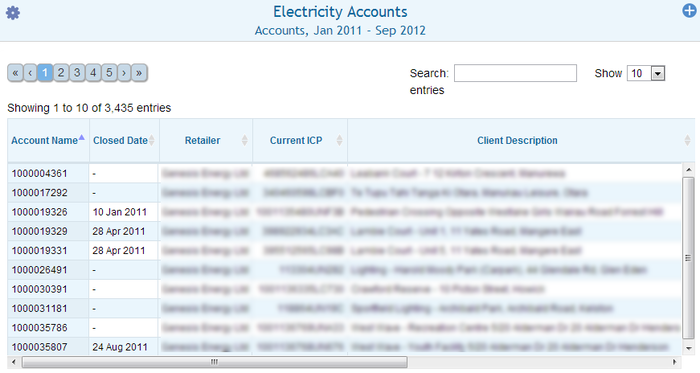
The account list shows all accounts matching the current [[Filtering Functions|filter]], with a column for each configured data value. The list can be sorted by data value by clicking the column header (clicking twice reverses the sort order). | The account list shows all accounts matching the current [[Filtering Functions|filter]], with a column for each configured data value. The list can be sorted by data value by clicking the column header (clicking twice reverses the sort order). | ||
| − | [[File: | + | [[File:Account Details.PNG|700px|right]] |
====Account Details==== | ====Account Details==== | ||
Clicking in a row in the account list makes the selected the primary [[Filtering Functions|filter]], switching the display a mode in which only details for the selected account are shown. | Clicking in a row in the account list makes the selected the primary [[Filtering Functions|filter]], switching the display a mode in which only details for the selected account are shown. | ||
Revision as of 16:28, 2 October 2013
| Purpose |
|
|---|
Configuration


| Settings | Description | Values |
|---|---|---|
|
| |
|
|
|
|
|
|
|
Display Behaviour
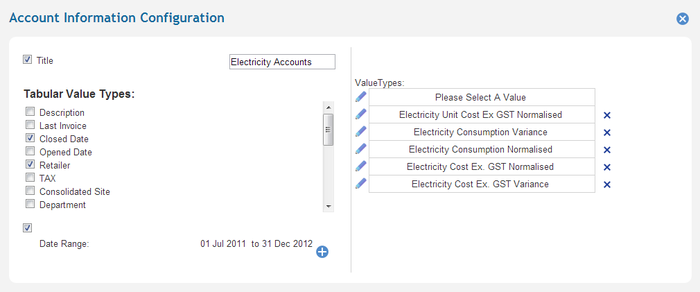
The Account information control displays data in to modes:
- Account list
- Account details
Account List
The account list shows all accounts matching the current filter, with a column for each configured data value. The list can be sorted by data value by clicking the column header (clicking twice reverses the sort order).

Account Details
Clicking in a row in the account list makes the selected the primary filter, switching the display a mode in which only details for the selected account are shown.
Account details marked with a pencil icon can be edited.